
 KonfAI
Processing large images#
Use this guide when a case is too large to materialise comfortably in RAM, or when you want OME-Zarr, HDF5, DICOM, or ITK storage to participate directly in patch loading. KonfAI can request regional windows from these backends, but whether a workflow actually streams is determined by both the dataset settings and the transform chain.
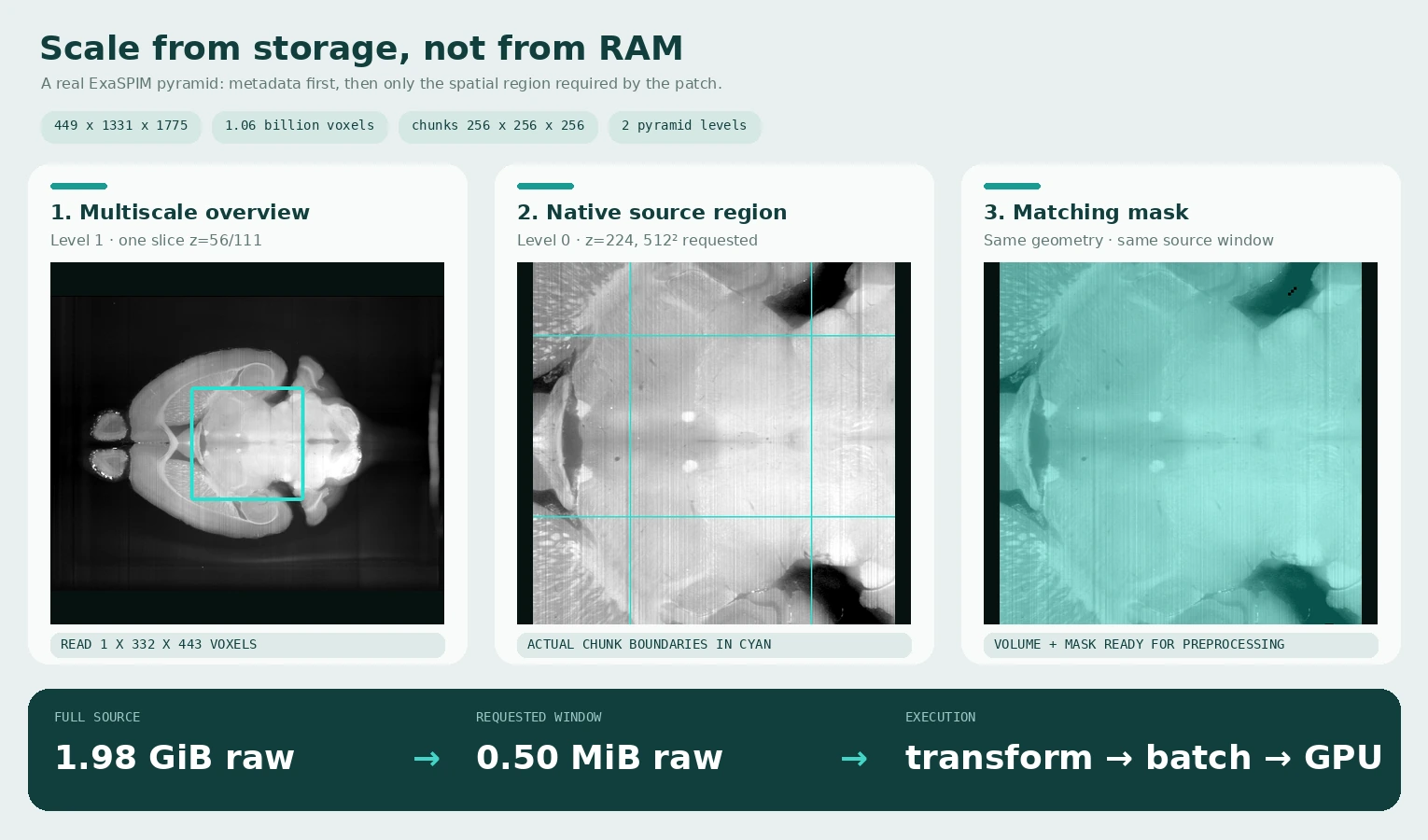
This is a real regional read from AIND ExaSPIM specimen 822175 (CC BY 4.0),
not a synthetic volume. The public source and derivative hashes are recorded in
the visual asset provenance manifest.
Level 0 contains 449 × 1331 × 1775 uint16
voxels (1.98 GiB uncompressed) in 256³ chunks. The figure reads one coarse
level-1 plane to locate the field of view, then asks KonfAI for one 512² region
at native resolution and the identical region from the mask. Only 0.50 MiB of
image pixels is materialised for that native plane window.
Choose the memory regime#
Streaming is derived from the pipeline; there is no streaming: true switch.
Dataset.use_cache, the optional memory_budget, and the transform chain lead
each case and augmentation draw to one of three regimes:
Regime |
When |
Memory held |
|---|---|---|
Cache |
|
Every case, resident across epochs. |
Stream |
|
The source region for one patch. |
Buffer |
|
A FIFO of |
memory_budget may replace the declared use_cache decision in any workflow.
A number is interpreted as GiB, strings may include units, and auto offers
80% of the detected per-rank memory limit. It is a size estimate—not a hard
allocator limit—because transformed shapes, augmented copies, and transient
construction peaks are not included. See Patch streaming for the
exact precedence and Training configuration for shuffle_window.
Dataset:
  dataset_filenames:
    - ./Dataset:omezarr
  use_cache: false
  batch_size: 2
  num_workers: 4
  Patch:
    patch_size: [64, 128, 128]
    overlap: 16
The equivalent source selector for a DICOM-series dataset is
./Dataset:dicom; dcm means a single file handled by SimpleITK, not the
DICOM-series backend. See Storage backends & formats for
the exact layouts and format tokens.
How the spatial planner derives a source read#
Every transform declares its patch locality: exact voxel, bounded halo, orientation remap, crop translation, global statistic, rescale, or whole volume. KonfAI walks the transform and sampled-augmentation chain and maps the requested output patch back to the source region on disk.
Locality |
Representative built-ins |
Regional work |
|---|---|---|
Pointwise |
fixed-bound |
Read the exact patch. |
Global statistic |
|
Stream the statistic once, then read the patch. |
Halo |
|
Enlarge the read and crop the result. |
Orientation |
|
Remap indices to the source. |
Crop |
|
Translate the target region. |
Rescale |
|
Map through scale and add interpolation context. |
Whole volume |
masked transforms, histogram matching, arbitrary displacement |
Use the bounded buffer. |
One region stage may appear in a streamable chain. Two remaps/halos/rescales,
an undeclared custom transform, an excessively large halo, or a global
statistic after a value-changing stage selects the safe whole-volume path.
WHOLE_VOLUME is the default for custom transforms, so missing locality
metadata reduces performance rather than silently changing results.
The backend must also serve a disk region efficiently. HDF5 and OME-Zarr do so natively, DICOM reads selected slices, and SimpleITK supports regional reads for uncompressed MetaImage and non-gzipped NIfTI. Compressed/unsupported formats still return correct patches but may decode the volume for every request, with a warning. The complete planner rules, built-in declarations, equivalence tolerances, and custom-transform contract live in Patch streaming.
OME-Zarr layout and levels#
Use one store per case and group:
Dataset/
├── CASE_001/
│   └── CT.ome.zarr/
└── CASE_002/
    └── CT.ome.zarr/
The selector may include a pyramid level, for example omezarr@1. KonfAI reads
metadata through get_infos() and touches only chunks intersecting the selected
window during a regional read. Chunk shape still matters: chunks much larger
than patches increase unnecessary I/O; very small chunks increase metadata and
decompression overhead.
The figure above is reproducible when the local ExaSPIM store is available:
pixi run --environment dev python docs/scripts/generate_scale_gallery.py \
  --root /path/to/ExaSPIM_Template/Data/Dataset_prepared \
  --case 822175
The generator calls Dataset.get_infos() for metadata and
Dataset.read_data_slice() for every displayed region. It never calls
read_data() or converts the full store to an in-memory array.
Dataset patching versus model patching#
These solve different problems:
Dataset.Patchcontrols what the dataloader sends to the model. Use it to bound source, preprocessing, batch, and forward memory.Model.ModelPatchsplits data again inside a KonfAI network. Use it for a heavy subgraph, a 2D/2.5D model inside a 3D workflow, or intermediate patch-level supervision.
Do not add model patching merely because dataset patches overlap. Start with
dataset patching, then add ModelPatch only if a network stage has a separate
memory or dimensionality requirement. See Model graph and output naming.
Tune in this order#
Set
use_cache: falseto force the stream/buffer path, or set amemory_budgetwhen dataset size should decide.Choose the largest
patch_sizethat fits the model and required context.Start with
batch_size: 1; increase it while measuring throughput and VRAM.Add overlap only when border quality requires it. More overlap means more reads and forward passes.
Increase
num_workersuntil storage or CPU preprocessing is saturated.Try
pin_memory: truefor CUDA transfer, then measure; it consumes locked host memory and is not universally faster.Use
prefetch_factoronly with worker processes and account for the extra prefetched batches in RAM.
Prediction may keep a reassembly accumulator on the GPU when it fits and fall back to CPU accumulation when it does not. Mean/Cosinus overlap blending and Mean/Median/Concat model or TTA reductions have different memory costs. The canonical prediction fields are in Prediction configuration.
Verify the behaviour you care about#
Do not infer streaming from a successful run alone—the fallback is designed to remain correct. Measure peak RSS and storage reads on a representative case, and compare the same model, patch size, overlap, TTA, batch size, workers, and hardware when evaluating performance.
KonfAI currently has no committed framework-wide benchmark against MONAI or nnU-Net under those controlled conditions. The regional-read mechanism is implemented and tested; general speedup claims require separate evidence.
Common failures#
RSS still scales with case size: the planner selected the bounded whole-volume path for that case or augmentation draw. Inspect the locality rules, or preprocess the unsupported operation once with
Saveand stream from that materialised dataset.OME-Zarr is slow: inspect chunk shape, compression, pyramid level, worker count, and overlap. Avoid assuming more workers always improve remote storage.
Output seams are visible: add overlap and select a compatible
patch_combine; confirm patch read and reassembly ordering has not been changed by custom code.CUDA OOM occurs after forwards complete: the volume-sized output or reduction may be the peak. Reduce output channels/TTA/ensemble size or let the predictor use CPU accumulation.
Next steps#
Storage backends & formats — backend capabilities and exact layouts
Patch streaming — planner rules, locality table, and fallbacks
Training configuration — loader, cache, patch, and worker fields
Prediction configuration — batching, TTA, ensembles, reduction, and output writing