
 KonfAI
Registration example#
This example is the shortest complete path from a fixed/moving image pair to a
registered medical image in KonfAI. It generates its own small dataset, trains
the built-in VoxelMorph, writes the warped image back as .mha, and measures
the error before and after registration.
It is deliberately a transparent learning task, not a clinical registration
recipe. Every MOVING image is a synthetic Gaussian-blob image translated by a
known offset, so you can inspect whether the workflow improves alignment without
downloading patient data.
Before you start#
The example lives in the repository rather than in the Python wheel. From a KonfAI checkout, install the ITK reader/writer and TensorBoard support used by training:
python -m pip install -e ".[itk,tensorboard]"
cd examples/Registration
A GPU is optional. The commands below show GPU 0; replace --gpu 0 with
--cpu 1 for a CPU-only run.
What the example contains#
examples/Registration/
├── make_dataset.py   # creates eight known FIXED/MOVING translations
├── Config.yml        # training workflow
├── Prediction.yml    # checkpoint inference and MOVED output
├── Evaluation.yml    # MAE/MSE before and after registration
└── README.md
The generated dataset has one single-slice, 64 × 64 pair per case:
Dataset/
├── CASE_000/
│   ├── FIXED.mha
│   └── MOVING.mha
├── CASE_001/
│   ├── FIXED.mha
│   └── MOVING.mha
└── …
FIXED is the reference image. MOVING is the same image translated by
(5, 4) voxels in (Y, X). Generate all eight cases locally:
python make_dataset.py
No patient data or network download is involved.
How the two images reach the model#
Config.yml declares FIXED and MOVING as input groups. Their order is
load-bearing:
FIXEDis model branch0and the target of the similarity loss.MOVINGis branch1and the image that the network warps.
The built-in registration.registration.VoxelMorph concatenates both inputs,
predicts a diffeomorphic deformation, and exposes the warped image at the named
module output MovingImageResample. Training attaches an MSE loss to that
output against FIXED.
Important
The current VoxelMorph warping components support dim: 2. Keep its configured
shape: [64, 64] aligned with the spatial part of the dataset patch
patch_size: [1, 64, 64] when adapting this example.
Run train → predict → evaluate#
1. Train the registration model#
konfai TRAIN -y --gpu 0 --config Config.yml
The supplied configuration trains for 60 epochs, reserves 25% of the eight cases for validation, and writes:
Checkpoints/REG_BASELINE/
Statistics/REG_BASELINE/
2. Materialise the registered images#
Choose a checkpoint created by training:
konfai PREDICTION -y --gpu 0 --config Prediction.yml \
  --models Checkpoints/REG_BASELINE/<checkpoint>.pt
For every case, prediction saves MOVED.mha under
Predictions/REG_BASELINE/Dataset/. Prediction.yml declares
same_as_group: FIXED:FIXED, so the registered image is written with the fixed
image geometry.
3. Compare alignment before and after#
konfai EVALUATION -y --config Evaluation.yml
Evaluation reads the original FIXED and MOVING images together with the
predicted MOVED images, then writes:
Evaluations/REG_BASELINE/Metric_TRAIN.json
The JSON contains both baselines:
MOVING:FIXED:MAEandMOVING:FIXED:MSEmeasure error before registration.MOVED:FIXED:MAEandMOVED:FIXED:MSEmeasure error after registration.
The repository example reports typical 60-epoch CPU results around 0.078 → 0.017 for MAE and 0.021 → 0.0008 for MSE. Exact values may vary, but a useful
run should make the after-registration errors clearly lower than the matching
before-registration errors.
What this baseline does—and does not—prove#
This example demonstrates the complete KonfAI registration workflow: ordered multi-input data, a named warped-image output, checkpoint inference, medical image materialisation, and structured before/after evaluation. It intentionally uses no augmentation and only an image-similarity MSE loss.
For a real deformable-registration study, you will normally add intensity preprocessing, a task-appropriate similarity criterion such as normalized cross-correlation, and a deformation-field smoothness regularizer. You must also validate geometry and alignment on representative data rather than treating successful execution as clinical evidence.
See registration on real medical images#
The four cards below come from a separate, executed IMPACT-Reg App run on
de-identified SynthRAD 2025 Task 1 abdomen case 1ABB123 (CC BY-NC 4.0).
They are not outputs from the synthetic VoxelMorph
tutorial above. This section demonstrates the packaged App path on real
medical images; the tutorial remains the small, reproducible learning exercise.
Full attribution and hashes are in the
asset provenance manifest.
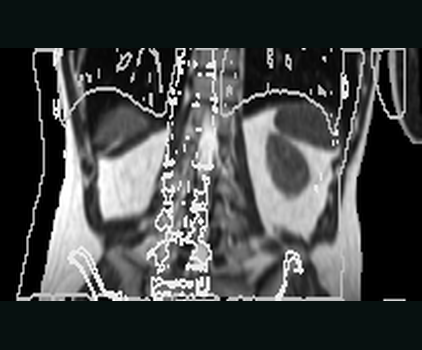
01 · REAL APP INPUTMoving MR — beforeFixed-CT contours expose the controlled metadata-only offset.NCC 0.129 · MAE 106.11 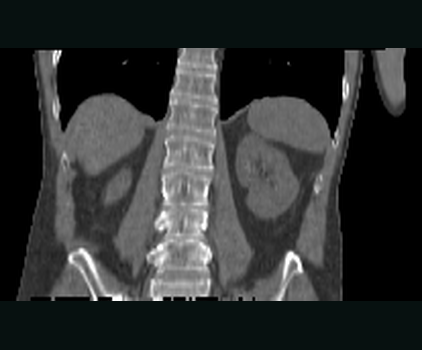
02 · REAL REFERENCEFixed CT targetThe reference image defines the physical output grid.222 × 226 × 124 · 2 MM GRID 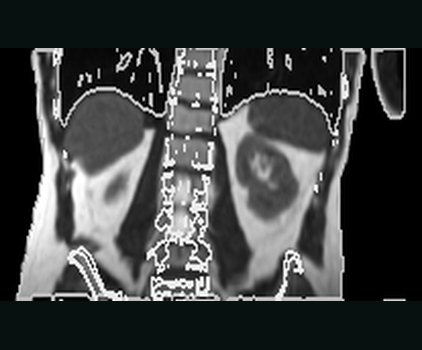
03 · REAL APP OUTPUTMoved MR — after ConvexAdam_Compositewrites the moved image on the fixed grid.NCC 0.937 · MAE 21.09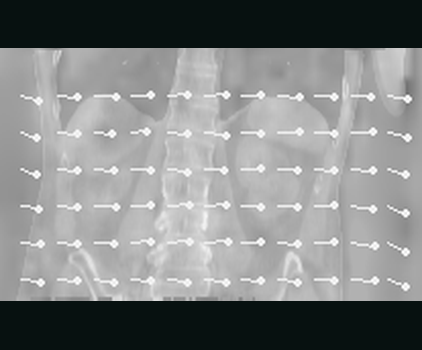
04 · PHYSICAL FIELDDisplacement fieldThree physical components in millimetres, with sampled vectors.MEAN 23.06 MM · P95 25.55 MM
One real pair, one completed IMPACT-Reg App execution.Controlled origin offset · ConvexAdam_Composite · NCC 0.129 → 0.937 · moved image + DVF + reusable transform
The registration gallery presents the same execution alongside the transform and augmentation evidence. Its generator validates the fixed-grid geometry and reads the completed medical-image artifacts; it does not synthesize a decorative before/after result.
See Using KonfAI Apps for the preset, measured before/after similarity, fixed-grid geometry checks, reusable transform, and Slicer delivery path.
Adapt it to your data#
Start by changing:
dataset_filenamesand theFIXED/MOVINGgroup names;preprocessing for your image modalities;
patch size and the matching VoxelMorph
shape;train_name, batch size, and validation split;the similarity loss and deformation regularization.
Keep the fixed input first, the moving input second, and verify the written geometry and before/after metrics on every adaptation.