
 KonfAI
Using KonfAI Apps#
KonfAI Apps are the deployment and reuse layer of the framework: packaged
workflows that expose a stable user interface on top of KonfAI’s low-level
prediction, evaluation, uncertainty, and fine-tuning logic. This page explains
what an app is and shows how to drive packaged apps with the konfai-apps
CLI — locally or against a remote server.
The screenshots below show Apps running through the real SlicerKonfAI client. They are actual interface captures with medical inputs and returned results—not procedural illustrations or simulated predictions.
What an app is#
Where low-level KonfAI workflows are designed directly through YAML files and local Python modules, a KonfAI App bundles those assets into a reusable package that can run through:
konfai-appson the command linePython via
konfai_apps.KonfAIAppa remote FastAPI server via
konfai-apps-serverclients such as 3D Slicer integrations
An end user does not need to write YAML to consume a published App. The YAML is still inside the bundle as the inspectable workflow record, so the same App can later be evaluated, fine-tuned, served, or automated instead of being replaced by an unrelated deployment script.
A KonfAI App repository is recognized by the presence of an app.json file.
Typical contents are:
my_app/
├── app.json
├── Prediction.yml
├── Evaluation.yml
├── Uncertainty.yml
└── checkpoint.pt
Depending on the app, some files are optional:
Prediction.ymlis the core inference entrypointEvaluation.ymlis needed forevalUncertainty.ymlis needed foruncertaintyfine-tuning relies on training assets and checkpoint files that live next to the app
When to use apps. Use low-level YAML workflows when you are still designing or debugging a model. Package it as a KonfAI App once that workflow is stable and you want:
a stable inference interface — a smaller, more repeatable interface for end users
reusable packaging for a team
distribution through Hugging Face or a private repository
local and remote execution with the same user-facing command
Turn a trained workflow into an App#
The bundle command is the research-to-application handoff. It validates the
metadata, copies prediction/evaluation configs and checkpoints, includes custom
Python when needed, and produces the directory layout understood by local,
Hugging Face, and server resolvers.
Create app.json:
{
  "display_name": "My segmentation model",
  "description": "Segments the target anatomy from CT.",
  "short_description": "CT segmentation",
  "tta": 0,
  "mc_dropout": 0
}
Then assemble the tested artifacts:
konfai-apps bundle CT_SEG \
  --out dist \
  --app-json app.json \
  --config Prediction.yml Evaluation.yml \
  --checkpoint Checkpoints/SEG_BASELINE/best.pt \
  --model-py Model.py
The result is dist/CT_SEG/. app.json.models is filled from the checkpoint
filenames when omitted, and an omitted requirements.txt is drafted from
Model.py imports. Review that draft—it is a convenience, not a reproducible
environment lock.
Validate the bundle locally before publishing:
konfai-apps infer ./dist/CT_SEG -i input.mha -o ./Output --gpu 0
konfai-apps eval ./dist/CT_SEG -i ./Output/<prediction>.mha --gt reference.mha
Inspect the output medical image, geometry, and evaluation values; a command
returning successfully is not sufficient validation. Once local inference is
equivalent to the research workflow, upload the CT_SEG/ folder as a variant
inside a Hugging Face model repository and address it as owner/repository:CT_SEG.
If the workflow uses no custom Python, omit --model-py. ONNX export is an
experimental optional addition (--onnx), not required for normal PyTorch App
execution.
The konfai-apps CLI#
The app CLI currently exposes these subcommands:
inferevaluncertaintypipelinefine-tune
The main command pattern is:
konfai-apps <command> <app> [options]
App identifiers#
Apps can be local or remote repository identifiers. The repository examples and tests show Hugging Face style identifiers such as:
VBoussot/ImpactSynth:MRVBoussot/ImpactSynth:CBCTVBoussot/TotalSegmentator-KonfAI:total
Ready-to-run Apps with measured workloads#
The published bundles are not toy examples. They package full medical models, their preprocessing and reconstruction, evaluation where available, and the metadata consumed by CLI, server, and Slicer clients.
App |
Executable workload |
Published bundle benchmark |
|---|---|---|
|
CT → 117 labels ( |
CT |
|
MRI → 40 labels, five-fold ensemble |
≈27 s, ≈22 GB VRAM and ≈2 GB RAM; original MRSegmentator ≈35 s and ≈11 GB RAM on the same case |
|
one CT/MR/CBCT model → 11 structures |
≈7 s, ≈10 GB VRAM and ≈1.6 GB RAM |
|
four MR/CBCT→sCT variants, five models each |
≈24 s and ≈16 GB VRAM for the benchmark inference; ≈82 s for all five; ≈2 GB RAM |
|
fixed + moving → |
≈5.1 s and ≈2.1 GB VRAM on a real abdominal MR→CT pair |
These are the conditions reported by each bundle README on an NVIDIA RTX PRO 5000 24 GB. Inputs and tasks differ, so the rows demonstrate deployable scale; they are not an apples-to-apples model leaderboard. Patch size, ensemble size, case dimensions and GPU placement are part of every result.
Together these READMEs describe four TotalSegmentator tasks, a five-fold MRSegmentator, one modality-agnostic ImpactSeg model, four ImpactSynth variants, and thirteen IMPACT-Reg presets. These are deployable medical workflows, not a catalogue of untrained architecture names.
One real case through the complete App workflow#
The cards below are built from de-identified SynthRAD 2025 Task 1 abdomen case
1ABB124 and the medical-image artifacts produced by the published Apps.
The source case is distributed under CC BY-NC 4.0; the exact attribution,
input/output hashes, and panel hashes are recorded in the
asset provenance manifest.
ImpactSynth ran five
checkpoints over the original input and two test-time augmentations (15 states);
the full TotalSegmentator App ran its five checkpoints on the resulting sCT.
KonfAI then executed the App’s evaluation and reference-free uncertainty
workflows—there are no fabricated predictions in this figure.
Each panel uses the same physical axial plane. The heat-map limits are robust
display ranges; the headline values come from the completed per-case metric
JSON, not from the displayed slice alone. ImpactSynth’s uncertainty is its
configured ensemble variance expressed as a percentage of the bundle baseline.
The displayed anatomy is the full five-model total output. Dice 0.665 comes
from a separate, single-checkpoint total-3mm evaluation branch and is not a
score assigned to the displayed five-model overlay.
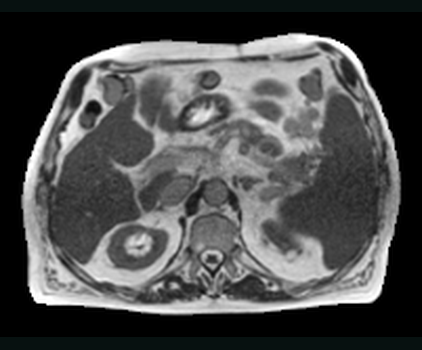
01 · INPUTMR inputOne extracted plane from the paired abdominal case.Z +18 MM · 2 MM GRID 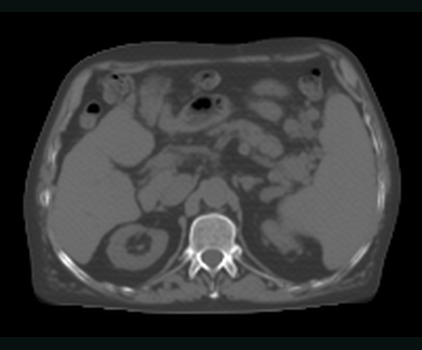
02 · PREDICTIONImpactSynth sCTFive checkpoints over the original MR and two TTA states.15 INFERENCE STATES 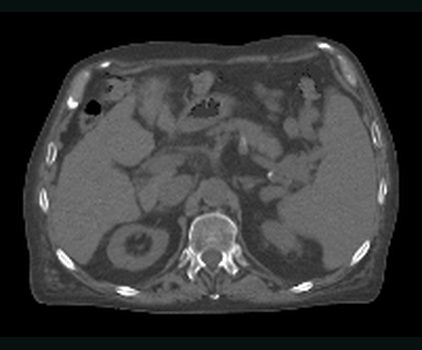
03 · REFERENCEPaired CTThe real target stays separate from the generated image.SAME PHYSICAL PLANE · 2 MM GRID 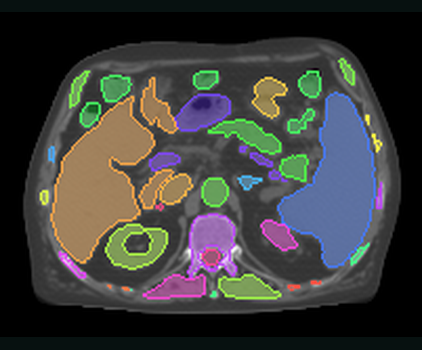
04 · DOWNSTREAM APPTotal anatomyThe full TotalSegmentator ensemble runs directly on the sCT artifact.FULL TOTAL OVERLAY · 5 MODELS 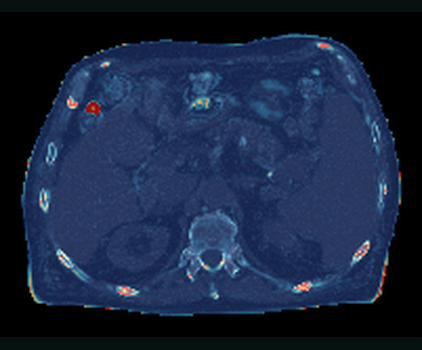
05 · EVALUATIONAbsolute-error mapDisplay range 0–438.20 HU (P99); case scores use the complete metric volume.MAE 22.94 HU · PSNR 34.16 DB · SSIM 0.913 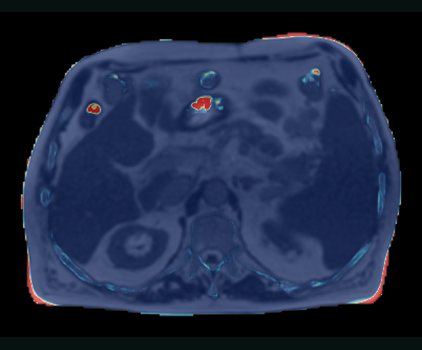
06 · UNCERTAINTYEnsemble uncertaintyDisplay range 0–4520.81% of baseline (P99) across the 15 states.MEAN 109.61% BASELINE · DISAGREEMENT 0.016
One real case, one continuous App workflow.MR → 15-state sCT → five-model anatomy · evaluation and uncertainty remain medical-image datasets
Reproduction snapshot: KonfAI 5195b79; ImpactSynth db04a8e. The committed
generator requests one plane from each image through SimpleITK’s extraction
API. Compressed MHA inputs may still require internal backend decompression.
Common app workflows#
These commands all use the same app package, but they expose different levels of workflow orchestration.
App family |
Typical input |
Materialised result |
Additional workflow |
|---|---|---|---|
Segmentation |
CT, MR, or CBCT |
label map on the input grid |
Dice evaluation, ensemble/TTA uncertainty |
Synthesis |
MR or CBCT |
synthetic CT with reference geometry |
masked MAE/SSIM-style evaluation, uncertainty |
Registration |
fixed + moving images |
moved image, DVF, transform |
image/label/landmark evaluation, field uncertainty |
Inference:
konfai-apps infer VBoussot/ImpactSynth:CBCT \
  -i input.mha -o ./Output --gpu 0
Evaluation:
konfai-apps eval VBoussot/ImpactSynth:CBCT \
  -i prediction.mha --gt ct.mha --mask mask.mha --gpu 0
Pipeline:
konfai-apps pipeline VBoussot/ImpactSynth:CBCT \
  -i input.mha --gt ct.mha --mask mask.mha -o ./Output -uncertainty
Registration is a first-class App family#
IMPACT-Reg packages thirteen rigid, rigid+B-spline, modality-specific MR/CT and CBCT/CT semantic presets, native ConvexAdam stages, and FireANTs presets. A preset produces the moved image and displacement field on the fixed grid. The registration orchestrator can average fields from several presets, write a reusable transform, evaluate image/segmentation/landmark pairs, and derive a voxel-wise field-spread map.
impact-reg-konfai register MR_CT_MRSeg MR_CT_TS \
  -f fixed_ct.mha -m moving_mr.mha \
  --uncertainty -o ./Registration --gpu 0
The following cards use the published ConvexAdam_Composite preset on
de-identified SynthRAD 2025 Task 1 abdomen case 1ABB123, distributed under
CC BY-NC 4.0 and detailed in the
asset provenance manifest.
Because its MR was already aligned by
IMPACT, the test changes only its origin (+20 mm X, -12 mm Y); its decoded
voxel values remain exactly identical, verified one plane at a time. This
creates a known, reproducible offset without inventing anatomy or interpolating
an input image.
The App writes Moved.mha, a three-component DVF.mha in millimetres, and a
reusable Transform.h5 on the fixed CT grid. Compared with the unshifted MR,
foreground NCC improves from 0.129 to 0.937 and MAE from 106.11 to
21.09. The field has a mean magnitude of 23.06 mm and a 95th percentile of
25.55 mm. These validation values were accumulated one axial plane at a time.
The generator requests plane-sized outputs; compressed sources may still be
decompressed internally by the imaging backend.
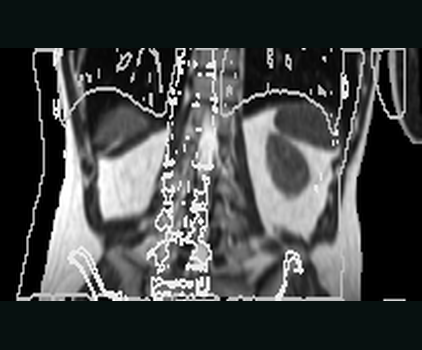
01 · MOVING INPUTMoving MR — beforeFixed-CT contours expose the controlled metadata-only offset.NCC 0.129 · MAE 106.11 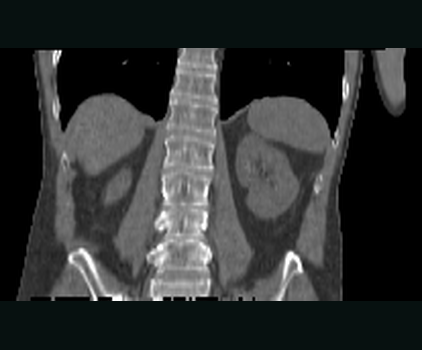
02 · FIXED REFERENCEFixed CT targetThe reference image defines the physical output grid.222 × 226 × 124 · 2 MM GRID 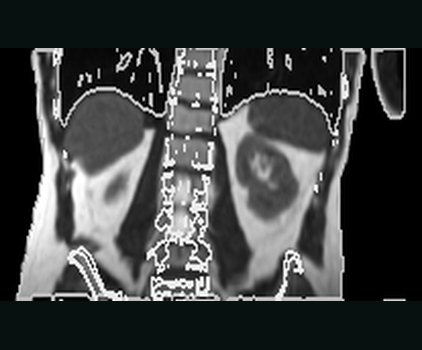
03 · MOVED OUTPUTMoved MR — after ConvexAdam_Compositewrites the result on the fixed grid.NCC 0.937 · MAE 21.09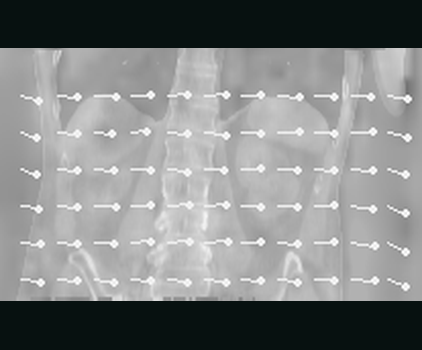
04 · PHYSICAL FIELDDisplacement fieldThree physical components in millimetres, with sampled vectors.MEAN 23.06 MM · P95 25.55 MM
A real registration run with an inspectable physical field.Controlled offset · ConvexAdam_Composite · NCC 0.129 → 0.937 · moved image + DVF + reusable transform
The light-gray body and bone contours come from the fixed CT and are overlaid
unchanged before and after registration. DVF brightness encodes full 3-D
magnitude; the sparse arrows show its in-plane X/Z components. Reproduction
snapshot: KonfAI 5195b79, ImpactReg 1e7ef81.
The work also exists at dataset scale. The IMPACT pipeline produced and published reusable Elastix B-spline transforms for:
SynthRAD 2023 IMPACT registrations: 317 MR→CT and 289 CBCT→CT transforms;
SynthRAD 2025 IMPACT registrations: 411 MR→CT and 638 CBCT→CT transforms.
These repositories contain transformation parameter files—not redistributed patient images. Each transform aligns the alternate modality into CT space. The released registrations use third-order B-splines, four resolution levels and a final 10 mm grid; their dataset cards document exclusions and the CC BY-NC 4.0 terms. They are concrete research artifacts behind the aligned pairs used to train and evaluate the synthesis workflows.
Grouped inputs#
The CLI accepts grouped inputs by repeating --inputs / -i. This matches the
grouping behavior documented in konfai_apps.cli.add_common_konfai_apps().
Use this when an app expects:
multiple input groups
multiple files per group
paired inputs such as image + mask
Fine-tuning#
Fine-tuning is available through:
konfai-apps fine-tune <app> <name> -d ./Dataset --epochs 10 --gpu 0
konfai-apps fine-tune <app> <name> -d ./Dataset --models CV_0 CV_1 --epochs 10 --gpu 0
Under the hood, the app installs training assets, links the dataset, then, for each selected
checkpoint, restarts training from its pretrained weights (fresh optimizer, learning-rate schedule
and epoch counter) so that --epochs fine-tuning epochs actually run. Use --models to choose which
checkpoint(s) to fine-tune (default: the first available); each is fine-tuned independently and
written back into the output app, which is left as a ready-to-use app bundle.
Remote execution#
Any konfai-apps command becomes remote as soon as --host is provided — the
CLI still looks the same; only the execution backend changes. The client then:
uploads inputs
schedules the job
streams logs over SSE
downloads the zipped result bundle
On the server side, jobs are queued, optionally assigned GPUs, executed in isolated temporary workspaces, and cleaned up after a grace period.
Start the server#
The server requires a JSON file listing the available apps:
konfai-apps-server --host 0.0.0.0 --port 8000 --apps konfai-apps/tests/assets/apps.json
Bearer-token authentication is enabled by default:
export KONFAI_API_TOKEN="my-secret-token"
konfai-apps-server --apps konfai-apps/tests/assets/apps.json
See CLI reference for the full konfai-apps-server flag reference.
Run a remote job#
konfai-apps infer VBoussot/ImpactSynth:CBCT \
  -i input.mha -o ./Output \
  --host my.server.org --port 8000 --token "$KONFAI_API_TOKEN"
The complete HTTP contract behind this — health, device, and app metadata endpoints plus job status, log, result, and kill endpoints — is documented in App server HTTP API.
Use the same App from 3D Slicer#
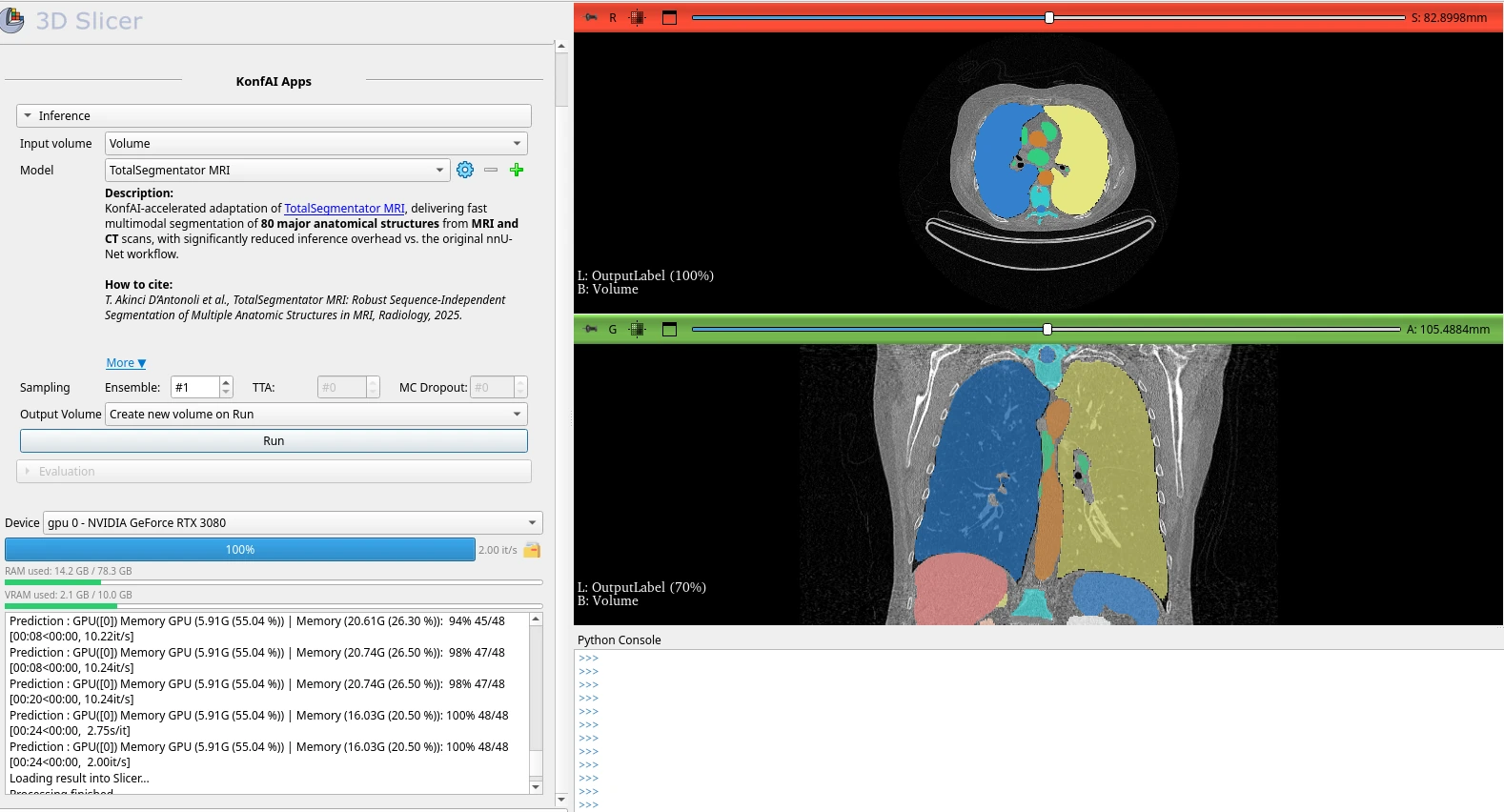
SlicerKonfAI is the external 3D Slicer client for KonfAI Apps. It lets a user select an App, map Slicer volumes to its declared inputs, launch local or remote execution, and load returned volumes or segmentations into the scene.
Treat Slicer as another client of the validated App, not a separate model
package: test the bundle with konfai-apps infer first, then configure the same
identifier in SlicerKonfAI. The integration is currently external and its
progress/output contract is less stable than the core Python API; pin compatible
KonfAI Apps and SlicerKonfAI versions for clinical-facing installations.
The real SlicerKonfAI workflow#
These are official SlicerKonfAI interface captures, not mockups. The inference view exposes the selected App and its description, ensemble/TTA/MC-dropout controls, device and memory state, live KonfAI logs, and the returned medical result in the Slicer viewers.
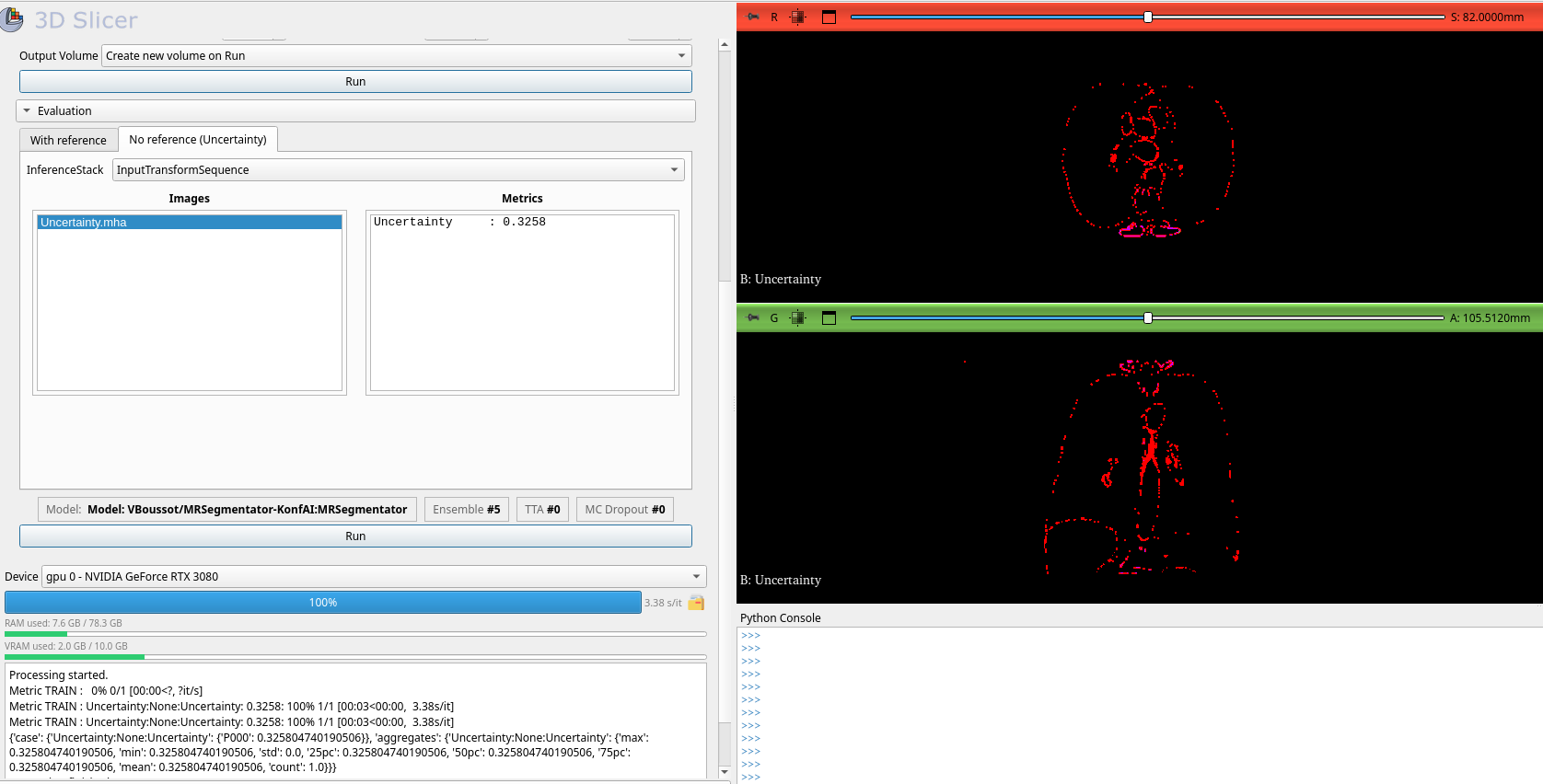
The same module keeps QA attached to the App. Without a reference, it consumes the inference stack and loads the App’s uncertainty image and summary metric:
When a reference exists, evaluation selects output/reference/mask nodes, runs the App’s configured metrics, and returns both numeric values and inspectable error maps:
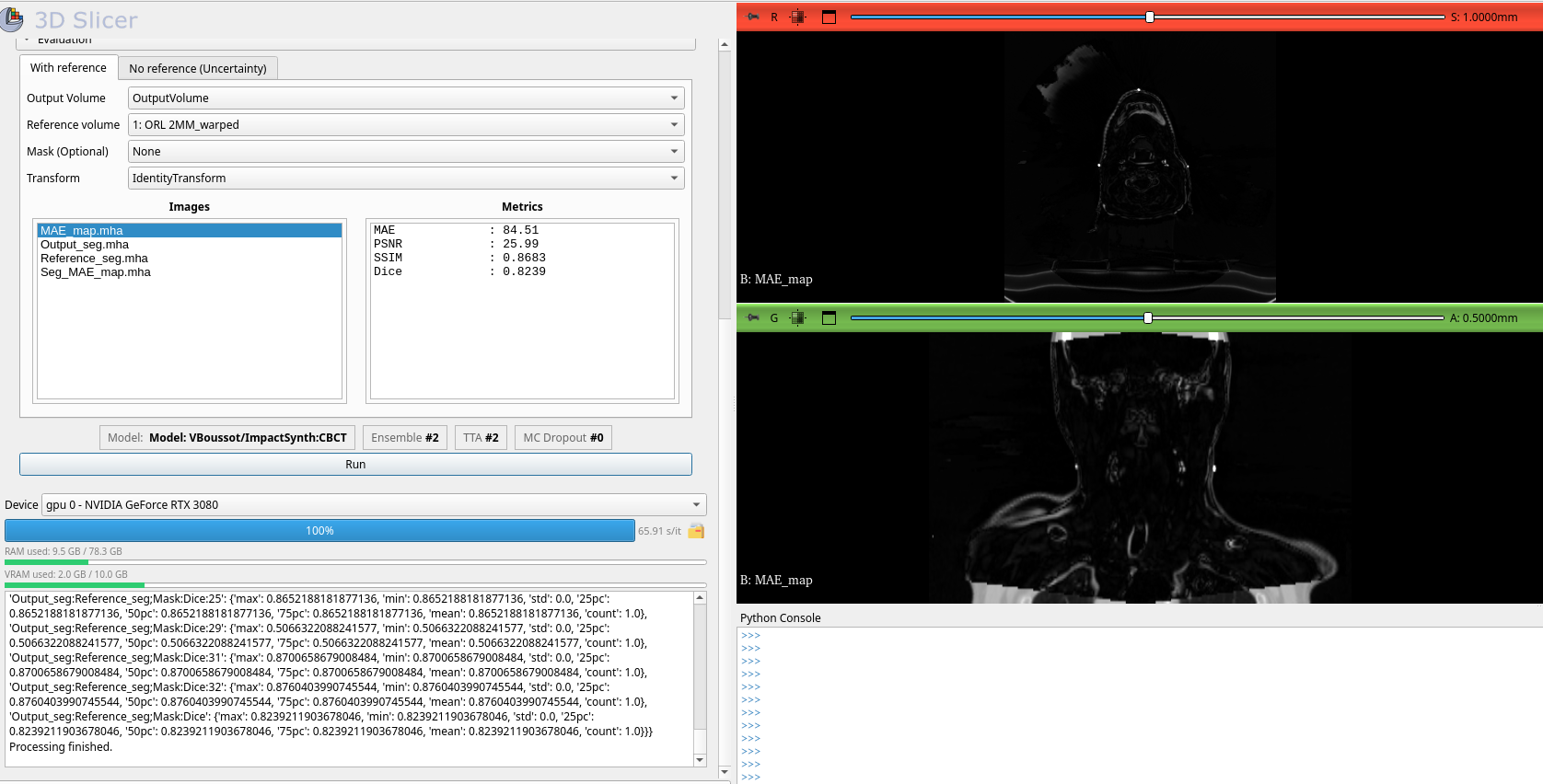
Screenshots are vendored from
vboussot/SlicerKonfAI at commit
4508683, under that repository’s Apache-2.0 license. They demonstrate the
actual GUI contract at that revision; controls may evolve in later releases.
Next steps#
CLI reference — the full flag reference for
konfai-appsandkonfai-apps-serverPython API (apps) — the
KonfAIApp/KonfAIAppClientPython API and the trust modelApp server HTTP API — the HTTP endpoint contract of the server