 KonfAI
KonfAI Studio (chat UI)#
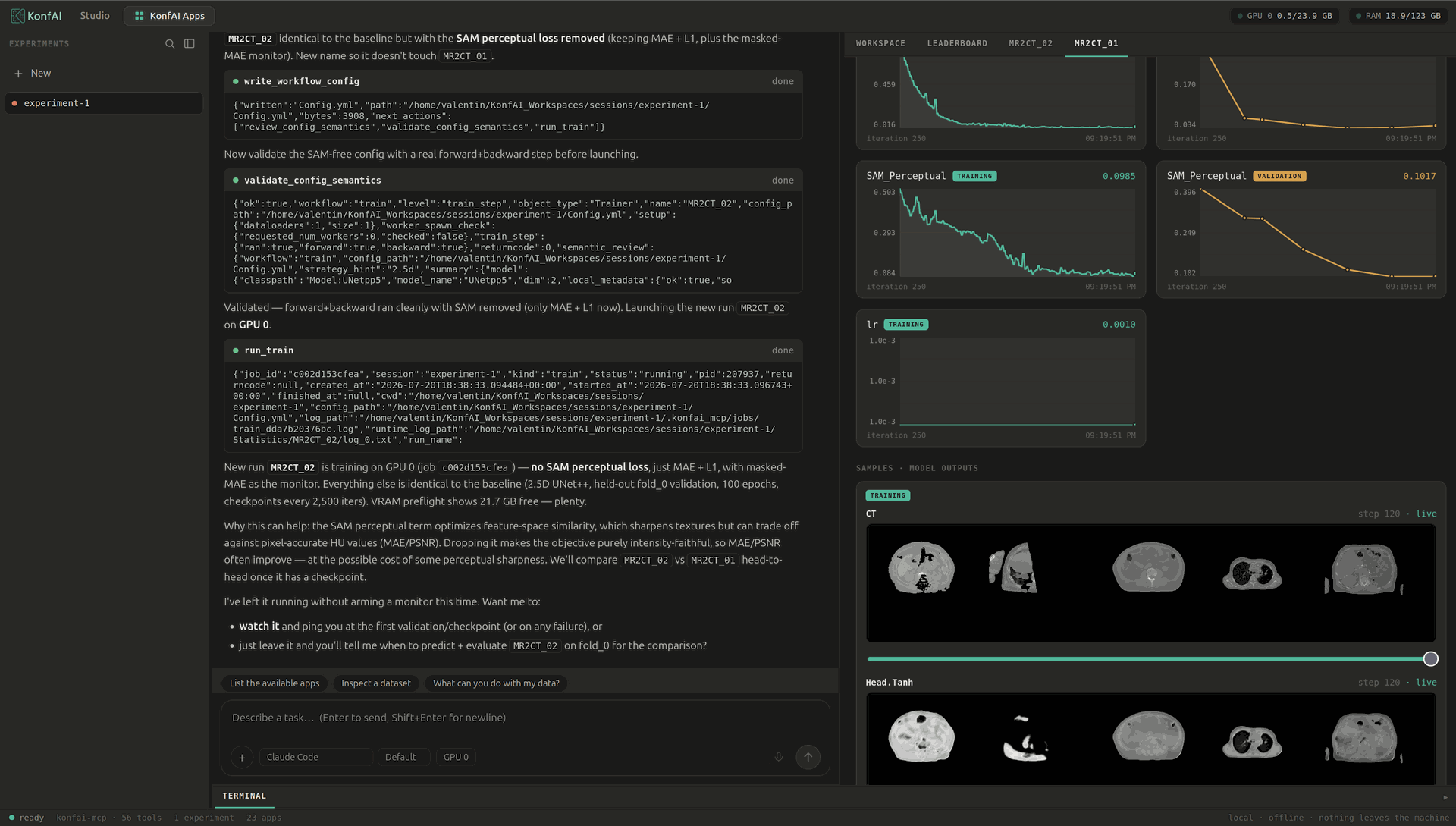
Point a chat window at a folder of scans and describe what you want — “train an MR-to-CT model on this dataset”, “segment these CT volumes and show me the result”, “compare this run against the baseline” — and carry the whole experiment out in the conversation: inspect the data, author or reuse a model, train, predict, evaluate, compare runs, view the volumes in a built-in NiiVue viewer, and keep a reproducible record of every experiment.
That is KonfAI Studio: a single chatbot web UI that drives
konfai-mcp end to end. It is a product surface, not a new
engine — every ability in the chat maps onto an existing konfai-mcp tool, so
the work it does is the same reproducible train / predict / evaluate loop a human
or an agent would run from YAML. Studio is a young package; treat it as the
conversational front door to the MCP server, not a replacement for it.
Your machine, your data. Studio is a Python package (konfai-studio) that
runs a small FastAPI backend and a built React front on your own machine. The
compute stays local and nothing is uploaded to a third party — the model you talk
to is the only external component, and you bring your own (see
Connect your LLM).
Install#
pip install konfai-studio
Studio ships the built front inside the wheel, so nothing else is needed to launch it. Two optional extras add the non-default LLM backends:
pip install "konfai-studio[anthropic]"   # Claude API with your own key
pip install "konfai-studio[openai]"      # any OpenAI-compatible / local server
Run#
konfai-studio # serves on http://127.0.0.1:8730
Open the URL in a browser and start a conversation. Studio binds to loopback
by default; --host and --port change the bind address:
konfai-studio --host 127.0.0.1 --port 8730
Exposing it beyond loopback needs a token and TLS — see Remote and on-prem.
Connect your LLM#
Studio ships no API key and no model — you bring the brain. The backend is
chosen by the KONFAI_STUDIO_LLM environment variable; credentials are always
yours, supplied through environment variables and never bundled. Pin a specific
model with KONFAI_STUDIO_MODEL (for example claude-opus-4-8, or
qwen2.5:14b for a local model).
1. Claude Code subscription (default)#
KONFAI_STUDIO_LLM=claude-code is the default and needs no API key. It
drives the model through the claude-agent-sdk, authenticated by your local
claude CLI login. If you already have Claude Code installed and logged in,
konfai-studio just works:
konfai-studio
2. Claude API (your own key)#
KONFAI_STUDIO_LLM=anthropic uses the Claude API with your own key. It needs the
[anthropic] extra.
export KONFAI_STUDIO_LLM=anthropic
export ANTHROPIC_API_KEY="sk-ant-…"
konfai-studio
An OAuth token, Amazon Bedrock, or Google Vertex are also supported through the standard Anthropic SDK environment.
3. Local / OpenAI-compatible server (100% local)#
KONFAI_STUDIO_LLM=openai points Studio at any OpenAI-compatible endpoint — a
local model server such as vLLM, Ollama, or LM Studio. This is the fully
local path: nothing leaves the machine at all. It needs the [openai] extra. Set
the endpoint with KONFAI_STUDIO_LLM_BASE_URL (and, if the server requires one,
KONFAI_STUDIO_LLM_API_KEY):
export KONFAI_STUDIO_LLM=openai
export KONFAI_STUDIO_LLM_BASE_URL=http://localhost:11434/v1   # Ollama
export KONFAI_STUDIO_MODEL=qwen2.5:14b
konfai-studio
What a session looks like#
In practice you keep one conversation going. You point Studio at a dataset and
ask it to inspect it; it browses the cases and reports the modality groups and
geometry. You ask for a model — it either reuses a published app or writes and
validates a KonfAI config — then launches training on a chosen GPU. While the job
runs, the live training feed, loss curves for every run, and periodic
model-output samples stream in a panel beside the chat. When it finishes you ask
for a prediction and an evaluation, read the metrics back, and compare the new run
against a baseline on the leaderboard. Each step is one konfai-mcp tool call, so
the resolved config and the run record stay on disk exactly as if you had typed
the commands yourself. The screenshot above is one such session, authoring an
MR→CT synthesis run.
Remote and on-prem#
Studio drives arbitrary host compute, so the launcher refuses a non-loopback bind
unless you set an access token. To reach it over a network, set
KONFAI_STUDIO_TOKEN and put it behind TLS / a reverse proxy. The full
single-operator deployment guide — token auth, TLS with Caddy or nginx, a systemd
unit, and the threat model — is in
studio/docs/REMOTE.md.